The key benefits of using your Online Account is the ability to quickly update or modify your orders.
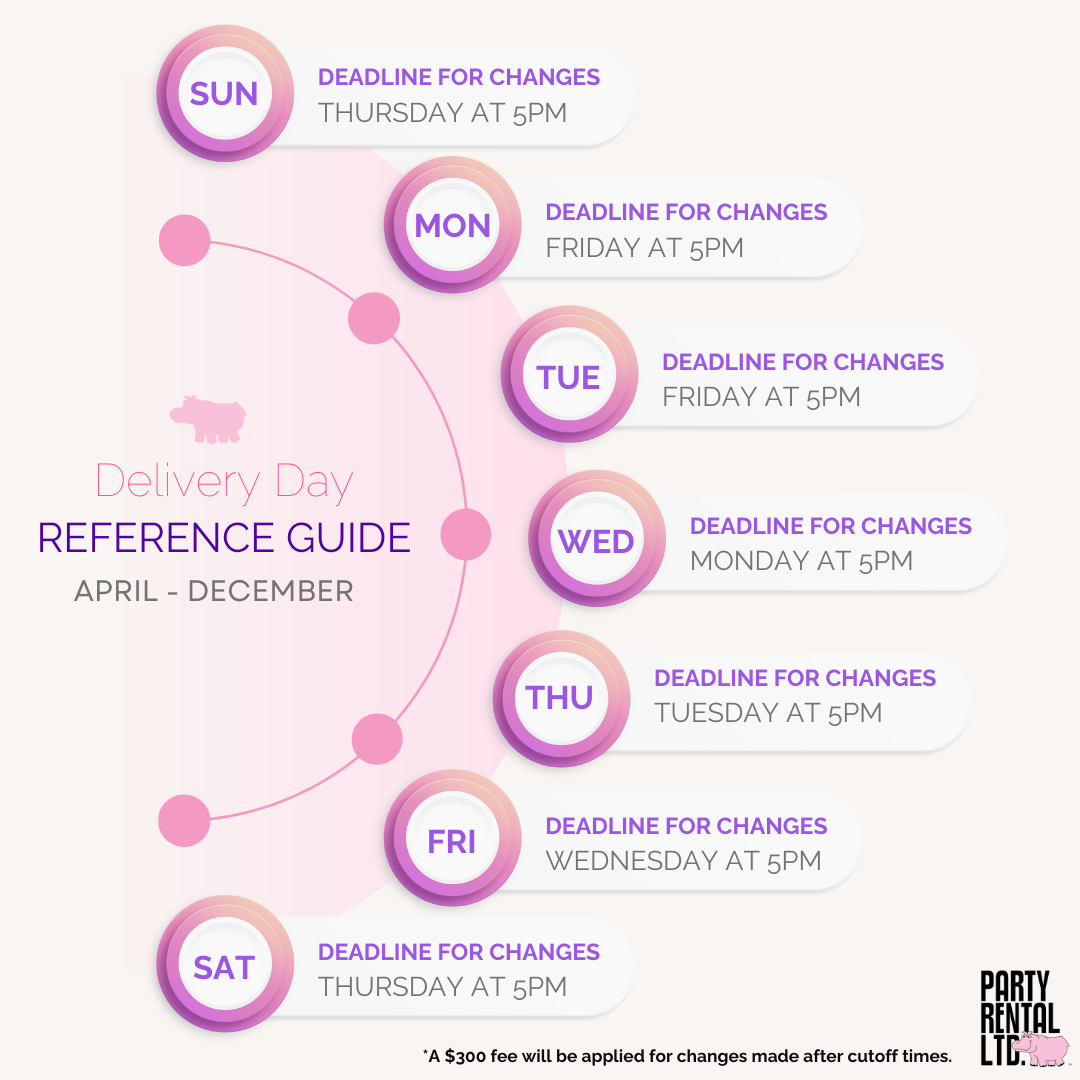
- You can revise, or cancel your order until 5:00 p.m., two (2) business days before your scheduled delivery.
- One business day before delivery - Removing items or canceling the order: A 100% cancellation fee applies.
- Adding items is allowed one business day before delivery, but a $300 processing fee will be applied.
Once it becomes the business day before delivery, all existing order items are considered final.
How to Update (Modify) Your Order
Log in to your account
Sign in at our website, then go to My Account.-
Find your upcoming event
Go to the Upcoming Events section.
If you don’t immediately see it, use the search bar (by event name or date).
Open the action menu
Click the three vertical dots (ellipsis) next to the event/order you want to change, then select Modify / Update.Enter the editing flow
Once you choose “Modify / Update,” you’ll be brought back into the checkout-style process so you can review and change different parts of your order.-
Make the edits you need
use the top navigation tabs to jump directly to categories like “Review order,” “Event Overview,” or “Delivery / Pickup.”
To change delivery or pickup details, go to the Delivery/Pickup tab. To update items on the order go to Review order.
You can also update: delivery address, event date and time, site-access notes, contact info, or upload a floor plan/file for delivery instructions.
-
Save your changes
After making edits, click Next Step to save them
You’ll then land on a Review & Submit page — double check your changes.
Finally, resubmit the order so your updates are processed in our system.
If you see a "Read Only" status, your order can no longer be edited through your account.
Our team can still help. Please contact Customer Care:
- Phone: 1-844-GO-HIPPO (464-4776)
-
Live Chat: Monday–Friday, 8:00 a.m. – 5:00 p.m.
Tip: Have your event number ready to speed things up.
Use the guide below to see when you can make updates to your order based on the delivery date of the order.